Footer
Essence
The theme displays a compact footer copyright below the main content area.
Customizing copyright text
The Footer copyright theme setting controls the copyright line. HTML is allowed, so you can add links, spans, or other markup.
To modify the copyright text, follow the steps below:
- Go to Settings → Site → Design & branding
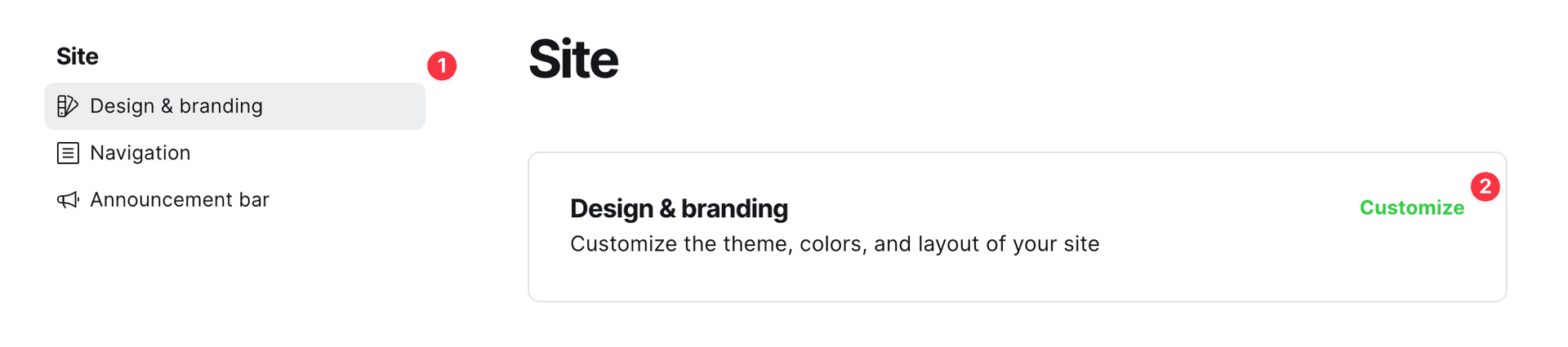
- Click Customize → Theme → Site wide
- Enter your text in the Footer copyright setting
When left empty, the theme shows the default: copyright year, site title, and “Published with Ghost & the theme”.
Example custom value:
© 2026 My Site. <a href="/privacy/">Privacy</a>See Footer settings for more detail on this theme setting.
Hiding “Published with Ghost & the theme”
Code Injection is required to add custom CSS.
If you want to keep the copyright year and site title but hide only the “Published with Ghost & the theme” part of the default text, add this custom CSS:
.footer-copyright > span {
  display: none;
}
Removing the copyright section
To completely remove the copyright text, set the Footer copyright setting to a whitespace character. Note that leaving this setting empty will result in the default copyright text being displayed.
Scope
The theme comes with prebuilt footer copyright with links to Ghost and the theme.
Customizing copyright text
To modify the copyright text, follow the steps below:
- Go to Settings → Site → Design & branding
- Click Customize → Theme → Site wide
- Change footer copyright text in Footer copyright setting
Hiding “Published with Ghost & Scope”
Code Injection is required to add custom CSS.
If you want to keep the copyright year and site title but hide only the “Published with Ghost & Scope” part, you can add this custom CSS:
.footer-copyright > span {
  display: none;
}
Removing the copyright section
To completely remove the copyright text, set the Footer copyright setting to a whitespace character. Note that leaving this setting empty will result in the default copyright text being displayed.
Footer Tags
You can display tags in the footer. To configure how many tags appear:
- Go to Settings → Site → Design & branding
- Click Customize → Theme → Site wide
- Change the Footer tags setting
See the Tags Settings page for more information on tag configuration.
Thoughts
The theme comes with prebuilt footer copyright with links to Ghost and the theme.
Customizing copyright text
To modify the copyright text, follow the steps below:
- Go to Settings → Site → Design & branding
- Click Customize → Theme → Site wide
- Change footer copyright text in Footer copyright setting
Hiding “Published with Ghost & Thoughts”
Code Injection is required to add custom CSS.
If you want to keep the copyright year and site title but hide only the “Published with Ghost & Thoughts” part, you can add this custom CSS:
.footer-copyright > span {
  display: none;
}
Removing the copyright section
To completely remove the copyright text, set the Footer copyright setting to a whitespace character. Note that leaving this setting empty will result in the default copyright text being displayed.
Feed
The theme comes with prebuilt footer copyright with links to Ghost and the theme.
Customizing copyright text
To modify the copyright text, follow the steps below:
- Go to Settings → Site → Design & branding
- Click Customize → Theme → Site wide
- Change footer copyright text in Footer copyright setting
Hiding “Published with Ghost & Feed”
Code Injection is required to add custom CSS.
If you want to keep the copyright year and site title but hide only the “Published with Ghost & Feed” part, you can add this custom CSS:
.footer-copyright > span {
  display: none;
}
Removing the copyright section
To completely remove the copyright text, set the Footer copyright setting to a whitespace character. Note that leaving this setting empty will result in the default copyright text being displayed.
Moment
The theme comes with prebuilt footer copyright with links to Ghost and the theme.
Customizing copyright text
To modify the copyright text, follow the steps below:
- Go to Settings → Site → Design & branding
- Click Customize → Theme → Site wide
- Change footer copyright text in Footer copyright setting
Hiding “Published with Ghost & Moment”
Code Injection is required to add custom CSS.
If you want to keep the copyright year and site title but hide only the “Published with Ghost & Moment” part, you can add this custom CSS:
.footer-copyright > span {
  display: none;
}
Removing the copyright section
To completely remove the copyright text, set the Footer copyright setting to a whitespace character. Note that leaving this setting empty will result in the default copyright text being displayed.
Aspect
The theme comes with prebuilt footer copyright with links to Ghost and the theme.
Customizing copyright text
To modify the copyright text, follow the steps below:
- Go to Settings → Site → Design & branding
- Click Customize → Theme → Site wide
- Change footer copyright text in Footer copyright setting
Hiding “Published with Ghost & the theme”
Code Injection is required to add custom CSS.
If you want to keep the copyright year and site title but hide only the “Published with Ghost & the theme” part, you can add this custom CSS:
.footer-copyright > span {
  display: none;
}
Removing the copyright section
To completely remove the copyright text, set the Footer copyright setting to a whitespace character. Note that leaving this setting empty will result in the default copyright text being displayed.
OnFlow
The theme comes with prebuilt footer copyright with links to Ghost and the theme.
Customizing copyright text
To modify the copyright text, follow the steps below:
- Go to Settings → Site → Design & branding
- Click Customize → Theme → Site wide
- Change footer copyright text in Footer copyright setting
Hiding “Published with Ghost & the theme”
Code Injection is required to add custom CSS.
If you want to keep the copyright year and site title but hide only the “Published with Ghost & the theme” part, you can add this custom CSS:
.footer-copyright > span {
  display: none;
}
Removing the copyright section
To completely remove the copyright text, set the Footer copyright setting to a whitespace character. Note that leaving this setting empty will result in the default copyright text being displayed.
Thesis
Footer description
- Go to Settings → Site → Design & branding
- Click Customize → Theme → Site wide
- Change footer description in Footer description setting
Footer copyright
The theme comes with prebuilt footer copyright with links to Ghost and the theme.
Customizing copyright text
To modify the copyright text, follow the steps below:
- Go to Settings → Site → Design & branding
- Click Customize → Theme → Site wide
- Change footer copyright text in Footer copyright setting
Hiding “Published with Ghost & the theme”
Code Injection is required to add custom CSS.
If you want to keep the copyright year and site title but hide only the “Published with Ghost & the theme” part, you can add this custom CSS:
.footer-copyright > span {
  display: none;
}
Removing the copyright section
To completely remove the copyright text, set the Footer copyright setting to a whitespace character. Note that leaving this setting empty will result in the default copyright text being displayed.
Format
The theme comes with prebuilt footer copyright with links to Ghost and the theme.
Customizing copyright text
To modify the copyright text, follow the steps below:
- Go to Settings → Site → Design & branding
- Click Customize → Theme → Site wide
- Change footer copyright text in Footer copyright setting
Hiding “Published with Ghost & Format”
Code Injection is required to add custom CSS.
If you want to keep the copyright year and site title but hide only the “Published with Ghost & Format” part, you can add this custom CSS:
.footer-copyright > span {
  display: none;
}
Removing the copyright section
To completely remove the copyright text, set the Footer copyright setting to a whitespace character. Note that leaving this setting empty will result in the default copyright text being displayed.